Operate

Your ERP keeps the record.
OPERA runs the work.

Maintenance and operations work in one platform: planned from real data, followed up in one place, and reported without anyone typing anything twice. It plugs into the maintenance management system you already run: SAP, Maximo, or whatever holds your work orders today.
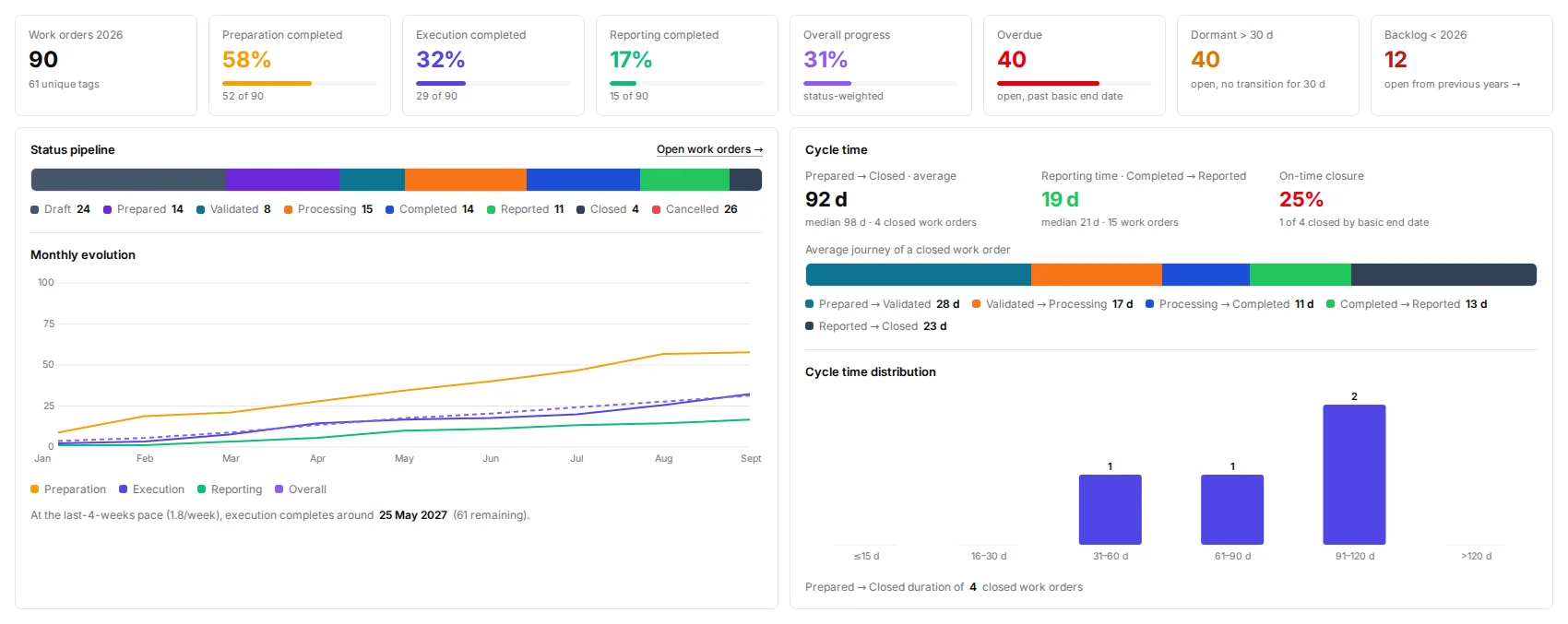

opera · dashboard
The OPERA work order dashboard: progress, pipeline and cycle time

The problem

The information exists.
Just not where the work happens.

Work orders sit in the ERP, routine results in separate files, contractor progress in spreadsheets and findings in emails. The result is avoidable manual effort, issues resolved late, and little visibility over how the work, and the asset, are actually performing.

With OPERA

One record, from the work order
to the report.

The same data serves execution, follow-up and reporting, so nothing is entered twice and nothing is rebuilt at the end of the month.

Entered once
Reports generated, not rebuilt
Live progress, down to each contractor campaign
From finding to work order in one step
One record for maintenance, operations and reliability
Operations team on an industrial site

In practice

Make every access window count.

On constrained assets, access, permits and production windows can cost more than the repair itself.

The routine check on an injection pump is recorded against the equipment. The performance test comes back NOK: the pump's reliability status drops, a corrective work order is raised from the same record, and the planner fits it into the unit window already booked for Thursday. The pump is fixed before it trips.

Inside OPERA

Three modules, one operational record.

01OPERA Main

One operational record, fed by maintenance, operations and contractors, producing the workMaintenanceOperationsContractorsWork ordersFollow-upsReportsOne record

The operational core

Work orders, work tasks and notifications in one database. Contractor campaigns followed live, findings turned into follow-up work, and reporting in real time.

02OPERA Routines

Recurring routines on three pieces of equipment, generating their work orders on time ROUTINESNEXT 6 MONTHS TODAY Pump check · 1MFilter ΔP · 3MVibration · 6M OctNovDecJanFebMarApr WORK ORDERS 3 generated on time · pushed to your ERP

Recurring work, without the overhead

Set up recurring checks and monitoring on specific equipment in minutes. OPERA generates the work orders on time and pushes them back to your ERP.

03OPERA Condition & Reliability

Readings and test results rolled up into a condition and a reliability status per equipment READINGS AND RESULTS Lube oil analysisC Vibration monitoringDEG Pump performance testNOK Coupling & guardOK STATUS · P-5501A Conditionworst of condition readingsC Reliabilityworst of functional testsNOK OPERATING WINDOWS1 excursion logged RISK MATRIX

Equipment condition

Every test result and condition reading feeds two statuses per equipment, condition and reliability, positioned on a risk matrix. Operating window excursions are logged on the system they affect.

Your information system

OPERA does not replace your ERP. It puts it to work.

You decide where the line sits.

Your master data stays where it is: SAP, Maximo, your specialist engineering tools. OPERA connects through open APIs. Preventive work stays in your ERP. For the small recurring checks your ERP is too heavy for, OPERA Routines generates the work orders and pushes them back. Corrective work is handled in OPERA and pushed back whenever you want it.

Security is scoped with your IT from the pilot onwards: single sign-on against your directory, hosting and access management agreed with your architects, and permissions by profile: technician, supervisor, planner, manager. No deployment starts without your IT's sign-off.

Deployment

Prove it on one site. Then scale.

1Scoping
2Setup and integration
3Pilot on one site
4Multi-site rollout
Four indicators, agreed before the pilot begins.
01Time from finding to work order
02Preventive compliance
03Notification-to-closure time
04Reporting time

Optimize

One shared view of the asset.
Better decisions across every discipline.

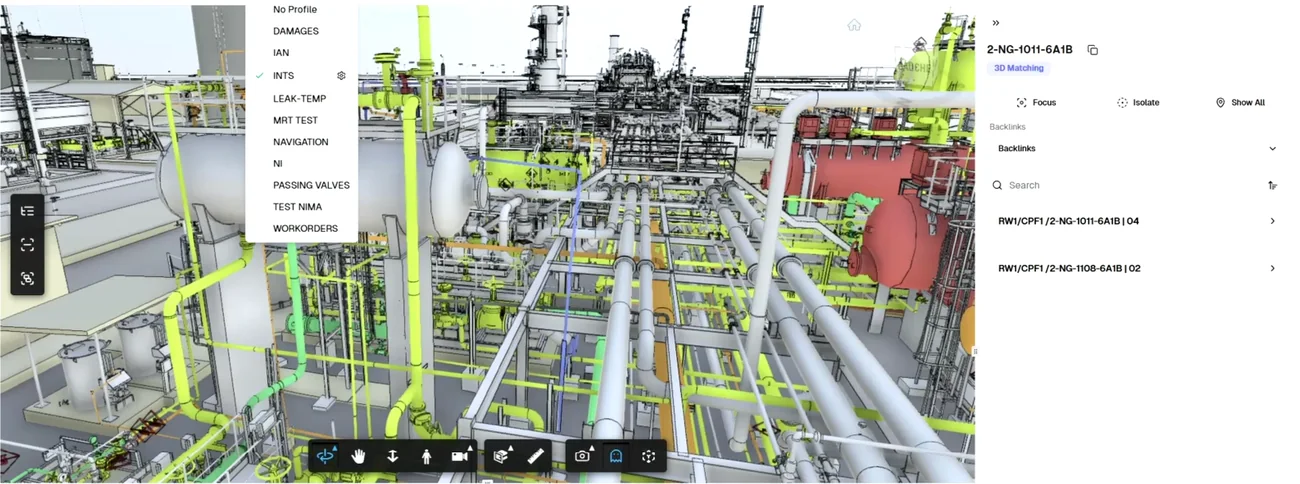
LENS connects OPERA data, P&IDs, 3D models and technical documentation in one interactive navigation environment. Maintenance, operations, HSE and engineering teams can explore the same asset in the same context, using a shared visual language.

Teams can project multi-disciplinary data onto equipment, simulate intervention scenarios and identify potential optimizations before execution. LENS turns siloed operational information into coordinated, asset-level decision-making.

lens · 3D navigation
LENS 3D navigation